FOR SMALL BUSINESSES AND FOUNDERS
Website trust badges, and how to tell which ones check anything
A trust badge is a small seal on a website that says someone else has looked at it. Some are only a picture anyone can copy. A badge means something when you can click it and land on a page, on the issuer’s own website, that names the site and says when it was last checked.
The three kinds you’ll see
- Picture-only seals. “Secure checkout”, “100% safe”, a shield and a tick. They link nowhere, or to the seller’s home page. Nobody checked anything, and any site can show one.
- Certificate seals. Given by the company that issued the site’s HTTPS certificate. They confirm the certificate exists, which any site can now get for free, and nothing else about the site.
- Scan badges. A company checks the site on a schedule, and the badge links to a page with the result. The Liaison badge is this kind.
Telling them apart
Click the badge. A real one opens a page on the issuer’s domain, with the name of the site you came from and a date. If the click goes nowhere, opens a picture, or lands on a page that could be about any site, the badge proves nothing about that site.
Then look at the date. A check from two years ago says little about the site today, since sites change every time a plugin updates.
What the Liaison badge shows
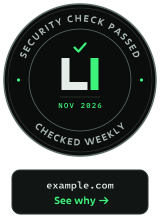
The badge shows your domain and links to liaison.vision/verify/ followed by your domain. That page lists, in plain words, each check the site passed and the date of the last one. Since the domain is on the badge and the page lives on liaison.vision, it can’t be copied onto another site.
The site is checked again every week. If it stops passing, you get an email first; after three failed checks in a row the badge turns grey by itself. Failures are never shown on the public page, so the badge never points an attacker at a weak spot.
To get it, the site needs HTTPS, HSTS and no private files open to download. All 19 checks.
Why visitors look for one
- 82% of shoppers say they are more likely to trust a site that shows a third-party verified badge (TrustedSite survey of 1,295 US consumers, 2026; TrustedSite sells trust badges).
- 19% of US shoppers who left a checkout did it because they didn’t trust the site with their card (Baymard Institute).
- 30% of breaches in Verizon’s 2025 Data Breach Investigations Report came in through a supplier or partner, up from 15% the year before. Bigger clients ask their suppliers about security more often because of it.
Questions
Can I make my own trust badge?
You can put any picture on your site. Visitors who click it will find nothing behind it, and a badge with nothing behind it can look worse than no badge at all.
Does a trust badge help Google rankings?
Not directly. Google doesn’t list trust badges among the things it ranks on. HTTPS is on that list, and it is one of the three checks the Liaison badge needs.
Is the Liaison badge free?
Yes. The check, the badge and the weekly emails are free.
What does the badge guarantee?
That on the date shown, the site passed the checks listed on its page. It isn’t a certification or a guarantee that the site can’t be attacked, and the badge terms say so.
Where do I paste it?
Liaison emails you one line of code. Steps for Wix, Squarespace, WordPress, Webflow, Shopify, Framer and hand-written sites.